Status Report
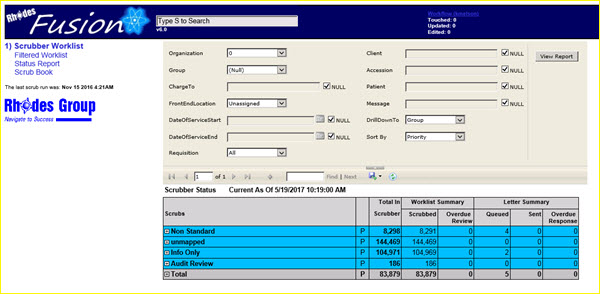
Click on the Status Report link to see statistics on the worklist tasks.
|
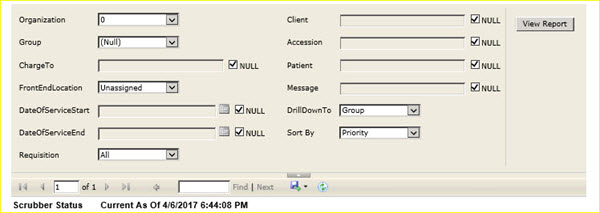
The standard filter panel shows the default parameters for the Scrubber Status report that is displayed below the panel.
|
You may use a single filter parameter or combinations of filter parameters to find the specific records that you need.
If you need to enter a filter parameter in a field that has a NULL checkbox, first uncheck the box, then you may enter the filter parameter.
Click the View Report button to display a new scrubber status report based on the defined filter, or search, parameters.
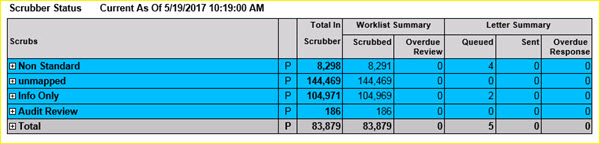
The scrubber status report includes several statistics for the selected worklist data.
|
The worklist report columns show the total number of accessions for each scrub in each column.
The blue rows above each represent a scrub group. The totals for each scrub group equal the total number of edits, or scrubs, in that scrub group. In the Non Standard scrub group, there are 8,298 edits in that group. The Non Standard scrub group may contain multiple scrubs.
The total line at the bottom of the report, in gray, is the total number of distinct accessions in scrubber now. Because accessions can be in more than one scrub, the totals of each row do not sum to the grand total at the end of the report.
Scrubber Status Report Column Definitions
|
Column Name |
Column Description |
|
Scrubs |
Scrub ID Group Name. If a scrub is not assigned to a group or subclass, it is listed under 'unmapped'. |
|
The 'P' column |
Click on the P link for a report. |
|
Total in Scrubber |
Total number of accessions in the selected worklist data. |
|
Worklist Summary |
|
|
Scrubbed |
Total number of accessions that have been scrubbed. |
|
Overdue Review |
Total number of accessions that are overdue for a review.
This is the number of accessions that have been scrubbed but have not been worked a by a user in the time specified in the ScrubParameters table; the response days field for each scrub. |
|
Letter Summary |
|
|
Queued |
Total number of letters that have been queued but not sent. |
|
Sent |
Total number of letters that have been sent. |
|
Overdue Response |
Total number of letters that are overdue for a response. |

| This document contains confidential and proprietary information owned by the Rhodes Group, Inc. This Information may not be downloaded, copied, or transferred, in any medium, either in whole or in part, except as allowed by the Rhodes Group. Copyright 2017, Rhodes Group Inc. | |
| Version 6.0, Release 1
Reference Manual |
Prepared by Rhodes Group
September 2017 |